Introduction
Supporting multiple languages in Flutter involves three primary concerns:
- Separation of text and code: avoids string literals in widgets.
- Complex language rules: plurals, gender variations, and formatting.
- Update agility: pushing copy fixes without full rebuilds.
Why Choose YAML Over ARB/JSON?
YAML offers:
- Clean, minimal syntax (indentation-based).
- Multi-line strings and inline comments.
- Natural nesting for logical domains.
Compare:
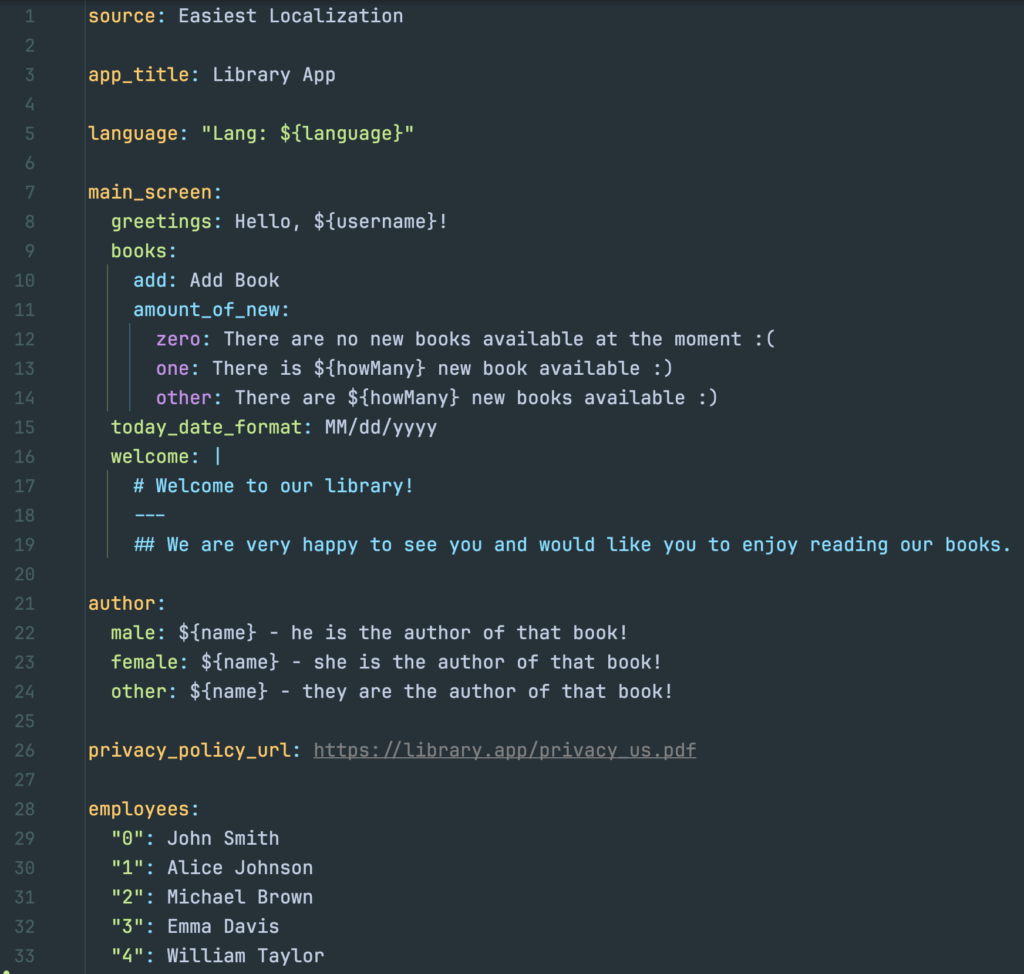
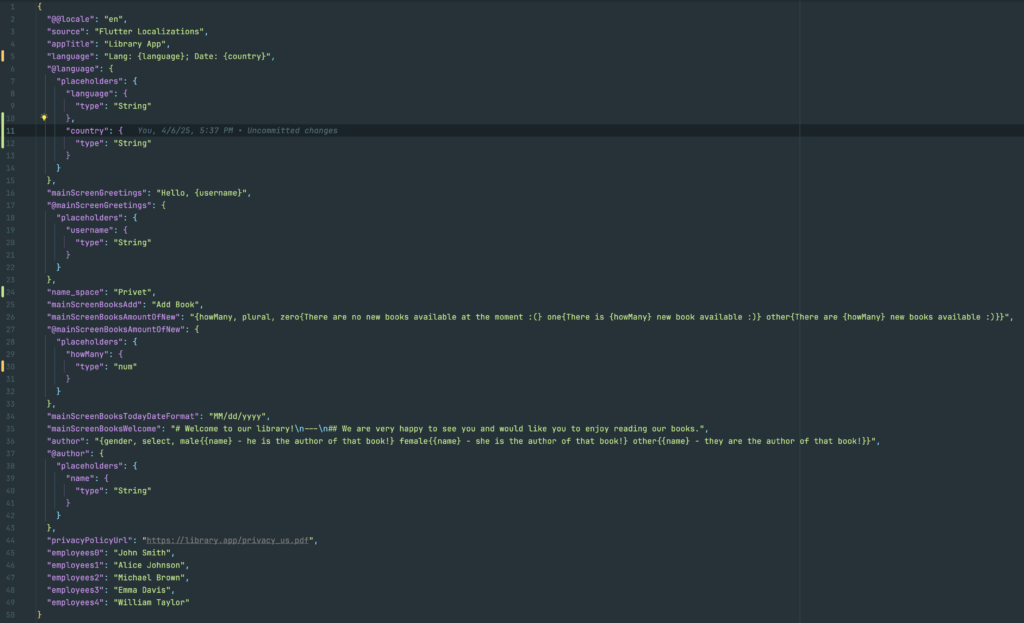
Three Localization Approaches were considered
- Official:
flutter_localizations+intl - Dynamic:
easy_localization - Typed‑YAML:
easiest_localization
Below, each section includes setup highlights, strengths, and limitations.
1. Official: flutter_localizations + intl
Note: Each library is easily discoverable on pub.dev by its name.
Strengths:
- Officially supported by Flutter core.
- Generated classes with typed getters and parameters.
Limitations:
- ARB/JSON has no comments and only flat keys.
- ICU MessageFormat syntax is verbose for plurals/gender.
- Every lookup requires
BuildContext. - Built-in approach does not support over-the-air content updates without custom delegates.
Example: Configuring MaterialApp with localization delegates
class MyApp extends StatelessWidget {
  @override
  Widget build(BuildContext context) {
    return MaterialApp(
      onGenerateTitle: (context) => AppLocalizations.of(context)!.appTitle,
      localizationsDelegates: AppLocalizations.localizationsDelegates,
      supportedLocales: AppLocalizations.supportedLocales,
      home: HomePage(),
    );
  }
}
Example: Accessing localized strings
final title = AppLocalizations.of(context)!.appTitle;

final greeting = AppLocalizations.of(context)!.greeting(userName: 'Alice');

2. Dynamic: easy_localization
Note: Each library is easily discoverable on pub.dev by its name.
Strengths:
- Rapid setup with minimal boilerplate.
- Supports JSON or YAML files.
- Built-in HTTP loader for remote translation files.
Limitations:
- Lookups are string-based, causing runtime errors on typos.
- No compile-time key checks or autocompletion.
- Locale variants require full file duplication (e.g.,
en_CAreplicatesen).
Example: Wrapping your app in EasyLocalization
void main() async {
  WidgetsFlutterBinding.ensureInitialized();
  await EasyLocalization.ensureInitialized();
  runApp(
    EasyLocalization(
      supportedLocales: [Locale('en'), Locale('es')],
      path: 'assets/translations',
      fallbackLocale: Locale('en'),
      child: MyApp(),
    ),
  );
}

class MyApp extends StatelessWidget {
  @override
  Widget build(BuildContext context) {
    return MaterialApp(
      localizationsDelegates: context.localizationDelegates,
      supportedLocales: context.supportedLocales,
      locale: context.locale,
      home: HomePage(),
    );
  }
}
Example: Accessing localized strings
Text('welcome'.tr());

Text('greeting'.tr(args: ['Alice']));
3. Option we picked: easiest_localization
Note: Each library is easily discoverable on pub.dev by its name.
Strengths:
- Full type safety: generated getters/functions match YAML placeholders.
- No dependency on
BuildContext. - Supports runtime merging of remote JSON/YAML with local defaults.
- Clean, nested files with comment support.
Limitations:
- Smaller community and ecosystem than official packages.
Setup highlights:
- Create nested YAML under
assets/i18n/en.yaml:home: greeting: "Hello, ${user}!" taskCount: zero: "No tasks" one: "One task" other: "${count} tasks" - Generate code:
dart run easiest_localization --watch - Integrate in
MaterialApp:import 'package:localization_gen/localization_gen.dart' as el; return MaterialApp( localizationsDelegates: el.localizationsDelegates, supportedLocales: el.supportedLocales, );
Example: Using generated APIs
Text(el.home.greeting(user: 'Alice'));
Text(el.home.taskCount(count: items.length));

Key Takeaways
To sum up, here are the advantages we gain from using easiest_localization:
- Static type safety (if the code compiles without errors, we know the localization content is correct)
- Treating content as code (extremely developer‑friendly, fast to work with, full IDE autocompletion)
- Easy, secure integration with third‑party localization services such as Crowdin (our case)
- Quick updates and additions of content with full support for all localization features—pluralization, arguments, and more
- Future‑proofing for real‑time content updates without needing to republish the app to the stores, while retaining all of the benefits above